Hypertext Transfer Protocol is a protocol for fetching resources such as HTML documents. It is the foundation of any data exchange on the Web and it is a client-server protocol, which means requests are initiated by the recipient, usually the Web browser. A complete document is typically constructed from resources such as text content, layout instructions, images, videos, scripts, and more.

Flows
- Open a [[TCP]] connection: The TCP connection is used to send a request, or several, and receive an answer. The client may open a new connection, reuse an existing connection, or open several TCP connections to the servers.
- Send an HTTP message: [HTTP messages] (before HTTP/2) are human-readable. With HTTP/2, these simple messages are encapsulated in binary structure (frames), making them impossible to read directly, but the principle remains the same.
- Read the response sent by the server.
- Close or reuse the connection for further requests.
HTTP messages
Clients and servers communicate by exchanging individual HTTP messages (as opposed to a stream of data). The HTTP messages sent by the client are called [[HTTP Request]] and the messages sent by the server as an answer are called responses.
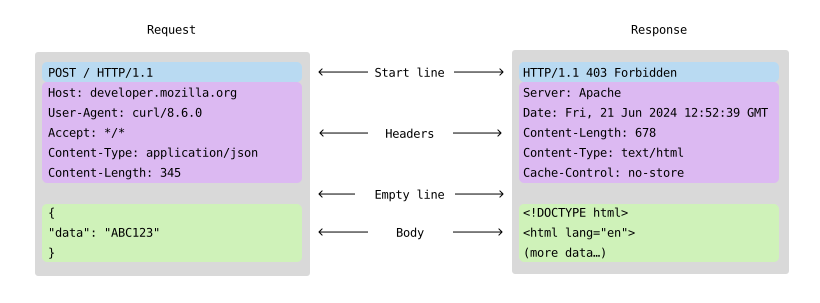
- A start-line is a single line that describes the HTTP version along with the request method or the outcome of the request.
- request:
Method Request-URI HTTP-Version,GET /index.html HTTP/1.1 - response:
HTTP-Version Status-Code Reason-Phrase,HTTP/1.1 200 OK
- request:
- An optional set of HTTP headers containing [[metadata]] that describes the message.
Header-Name: Header-ValueContent-Type: text/htmlAuthorization: Bearer abc123
- An empty line indicating the metadata of the message is complete.
- An body containing data associated with the message. And its format is indicated by the
Content-Typeheader.- request methods
POST,PUT - response resource: HTML, JSON, image, or error message
- request methods
- The HTTP protocol defines the structure of the request body but does not specify how frameworks should expose it.
- Using
request.data,request.json,req.bodyto access the request body is a convention rather than a part of the HTTP protocol itself. This convention is commonly found in web frameworks and libraries (e.g., Flask, Django, Express.js) to simplify access to the data sent in the body of an HTTP request.
- Using
data type
All HTTP messages (requests and responses) are ultimately transmitted as [[binary data]] over the network, because at the lowest level, all data transmitted over networks (e.g., TCP/IP (TCP)) is sent as binary data (sequences of 0s and 1s).
- The headers and start line of an HTTP message are text-based (encoded in ASCII or UTF-8), but they are still transmitted as binary data.
- The body of the message can be either text (e.g., [[JSON]], HTML) or binary (e.g., images, videos, executables), but it is also transmitted as binary data. The Content-Type and Content-Length headers describe the binary data.
- To transmit more sophisticated data, we need to serialize (Serialization) it first.
|
|
|
|
HTTP/2
HTTP/1.x also has a problem called head-of-line (HOL) blocking, where a client has to wait for a response from the server before sending the next request. HTTP pipelining tried to work around this, but poor support and complexity means it’s rarely used and difficult to get right. Several connections need to be opened to send requests concurrently; and warm (established and busy) connections are more efficient than cold ones due to TCP slow start.
HTTP/2 allows you to use a single TCP connection for multiple requests and responses at the same time. This is done by wrapping messages into a binary frame and sending the requests and responses in a numbered stream on a connection. Data and header frames are handled separately, which allows headers to be compressed via an algorithm called HPACK. Using the same TCP connection to handle multiple requests at the same time is called multiplexing.
REST API
- REST (Representational State Transfer) is an architectural style for designing networked applications.
- A [[REST API]] is an API (Application Programming Interface) that adheres to REST principles and uses HTTP as its underlying protocol.
- REST APIs expose resources (e.g., users, products) as URLs (endpoints) and use HTTP Method (HTTP Request) to perform [[CRUD]] operations on those resources.